
To register for the Easy Realty Agent Portal, visit hub.easy.realty, click "Agent Portal" in the top navigation bar, then click "Register Now" and enter your email address and password. Follow the four steps below to complete registration.
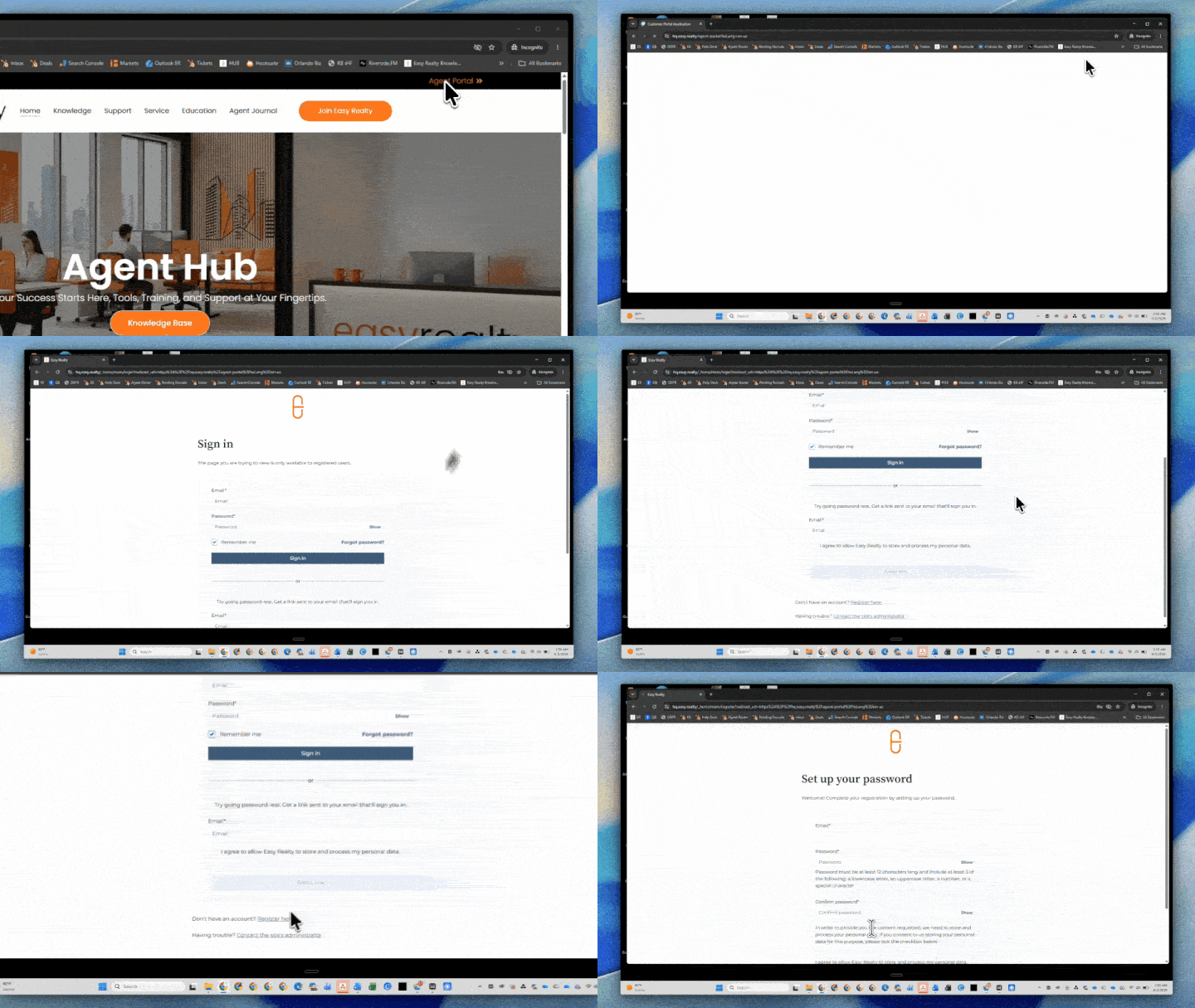
- Go to the Agent Hub — Visit hub.easy.realty.
- Open the Agent Portal login page — In the black navigation bar at the very top of the page, click "Agent Portal" on the right-hand side.
- Click "Register Now" — On the login page, scroll to the bottom and click the Register Now link.
- Create your account — Enter your email address and create a password to complete registration.
Visit the Agent Hub at:
http://hub.easy.realty
Step 2: Open the Agent Portal login page
At the very top of the page, look for the black navigation bar.
Click “Agent Portal” on the right-hand side.
Step 3: Click “Register Now”
On the login page, scroll down to the bottom.
Click the “Register Now” link.
Step 4: Create your account
Enter your email address and create a password to register for the portal.
Once your account is created, you can log in at any time through the Agent Portal.
What can you do inside the Agent Portal?
After logging in, you can:
After logging in, you will be able to:
- Submit new support requests
- Track current support tickets
- View your full history of past requests